Buy wwtms.com ?
We are moving the project
wwtms.com .
Are you interested in purchasing the domain
wwtms.com ?
domain@kv-gmbh.de · 0541-91531010
Buy wwtms.com ?
Why does the HP Pavilion laptop stay black?
The HP Pavilion laptop may stay black due to a variety of reasons. It could be a result of a hardware issue such as a faulty display or a disconnected internal component. It could also be caused by a software problem such as a corrupted operating system or a malfunctioning graphics driver. Additionally, the laptop may stay black if the battery is drained or if there is a problem with the power supply. Troubleshooting the specific cause of the black screen can help determine the appropriate solution. **
Why is the HP printer 5520 not printing black?
There could be several reasons why the HP printer 5520 is not printing black. One common reason is that the black ink cartridge may be empty or clogged. Another possibility is that the printhead may be dirty or damaged. It is also possible that there may be a software issue causing the printer to not recognize the black ink cartridge. It is recommended to check the ink levels, clean the printhead, and ensure that the correct printer driver is installed to troubleshoot and resolve the issue. **

Similar search terms for HP-45-51645A-Black
Top-Angebote
Products related to HP-45-51645A-Black:
-
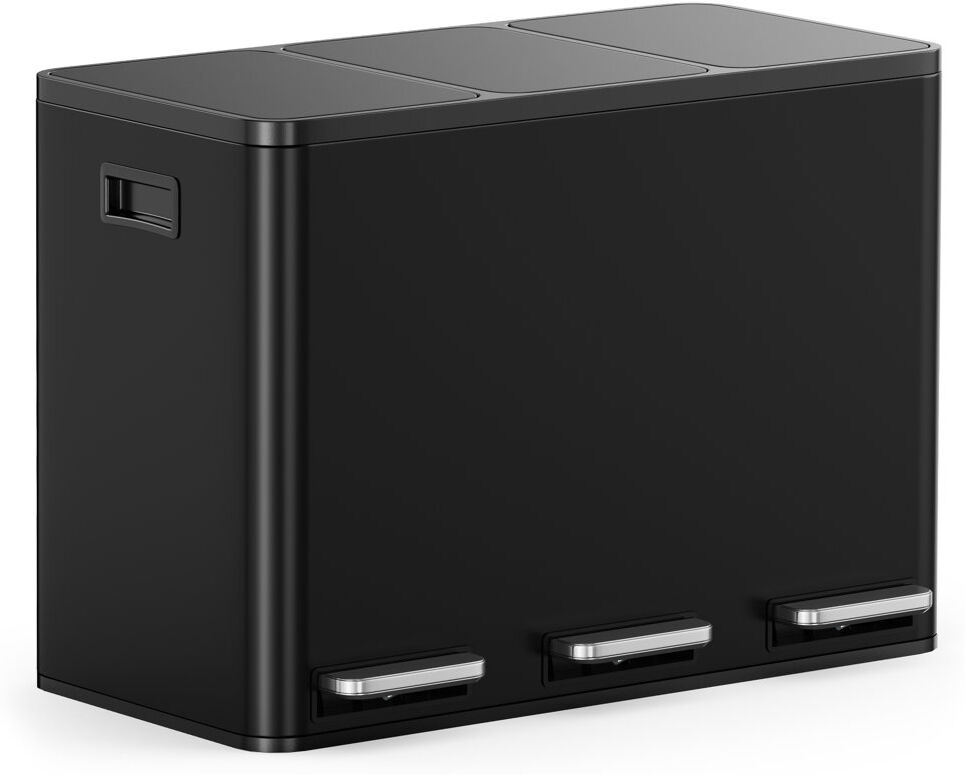
Vonhaus Stainless Steel 45 Litre Step On Multi-Compartments Trash & Recycling Bin Matte Black 45LVonHaus 30L Dual Compartment Bin for Waste & Recycling Streamline your recycling today. Streamline your waste and separate as you go with the VonHaus dual recycling bin – designed to keep everything in one place and take the hassle out of waste management. The soft-close 85° lid ensures smooth, quiet operation in busy kitchens, without slamming shut or hitting the wall. Double Recycling Bin 2 Compartment Bin with Soft-Close Lids Both hygienic and convenient, this kitchen bin offers hands-free operation, so you can maintain a clean and tidy kitchen. With a compact design ideal for smaller kitchens, the two 15L compartments provide a space-saving solution for bottles, cans, and general waste. Once the kitchen recycling bin is full, use the integrated handles to empty the removable inner bins. Designed to keep your waste in and pests out, the firm-shut odour-seal lids take the rubbish out of rubbish bin! Non-Slip Base Ensures sturdy pedal operation and reduces spills. Even in manic family kitchens, rest assured that the two compartment bin will stay firmly in place. Design Sleek, robust, and rust-resistant. Our dual pedal bin works in any space, with a fingerprint-resistant finish for that smart aesthetic. Hands-Free Operation Waste separation, made simple and hygienic. Create an orderly recycling system with ease using the double compartment bin's foot pedals. 2 x 15L Compartments Space-saving bin with recycling compartment. Easily empty out your dual rubbish bin, or use the inner bins outside for BBQs and garden parties. Ergonomic Soft-Close Lid Use the twin bin without slams or odours escaping. The odour seal traps unpleasant smells, letting you position the double pedal bin anywhere you like. HANDS-FREE OPERATION: Bin your waste without faff, mess, or spillages with the VonHaus 3 compartment bin, finished with firm shut lids to keep furry friends out and an odour seal to keep unwanted smells contained.. 45L TOTAL CAPACITY: Each compartment has a 15L capacity, ideal for small families looking for a compact, organised solution. Measuring H44 x W61.5 x D34.5cm, this triple bin is designed to sit neatly in any space.. REMOVABLE INNER BINS: Make waste organisation a breeze, from sorting your rubbish to emptying out the kitchen recycling bin. The internal buckets feature handles for easy maintenance.. FINGERPRINT-RESISTANT STAINLESS STEEL: Both robust and stylish, this matte black kitchen bin will level up your kitchen – in organisation, style, and quality. Regain order in busy family kitchens today.. OUR BRAND PROMISE: Established in 2009, VonHaus puts kitchen hygiene first. Crafted to the highest quality, upgrade your waste organisation today with our recycling bins for kitchen.. Brand Name: Vonhaus. Colour: Matte Black74,99 £*Shipping: 0,00 £Secure redirect to the provider
-
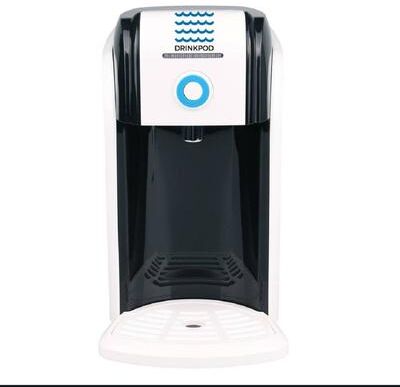
DRINKPOD Hydrate Mineral Spring Countertop Water Filtration Purification System, 4 Stage Water Filter, Water Dispenser**Upgrade Your Drinking Water with a Premium Tabletop Water Dispenser** Enhance your hydration experience with a high-quality tabletop water dispenser that provides refreshingly pure water at your fingertips.113,15 $*Shipping: 0,00 $Secure redirect to the provider
-
HP 970 Original Ink Cartridge - BlackDescription Ideal for users of HP OfficeJet Pro X451, X476, X551 and X576 printers, the HP 970 Original Ink Cartridge provides black ink for everyday printing needs. This standard-size cartridge is supplied as a single item and is designed for use with the specified HP OfficeJet Pro printer models. With a page yield of 3000 pages per cartridge, it supports regular home or office printing while delivering consistent print quality and reliability. The cartridge contains original HP ink and has a weight of 170 g, with dimensions of 7.2 x 2.7 x 24.2 cm (H x W x L). An essential addition for compatible HP OfficeJet Pro printers requiring a black ink cartridge.51,99 £*Shipping: 0,00 £Secure redirect to the provider
-
HP Rechargeable Active Pen G3 - BlackDescription Discover the wonders of digital inking with the HP Rechargeable Active Pen G3. This pen is designed for users who seek a seamless writing and drawing experience on their touch applications. It reduces the force required for inking, making it easier to write and draw onscreen compared to previous models. With a quick launch feature for apps and shortcuts, this pen enhances productivity and creativity. The rechargeable battery ensures that you never miss a note, providing convenience for those who rely on digital tools for their work or hobbies. An essential addition for anyone looking to elevate their digital writing and drawing experience.21,99 £*Shipping: 0,00 £Secure redirect to the provider


-
Why is the HP 3070a not printing in black?
The HP 3070a may not be printing in black due to a clogged printhead or a low ink level in the black cartridge. It is also possible that the printer settings are configured to use color ink instead of black ink for printing. Additionally, there may be a software issue or a connectivity problem causing the printer to not recognize the black ink cartridge. It is recommended to check the ink levels, clean the printhead, and ensure that the printer settings are configured correctly to troubleshoot the issue. **
-
Why is the HP Deskjet not accepting the black cartridge?
There could be several reasons why the HP Deskjet is not accepting the black cartridge. It could be due to a compatibility issue with the cartridge, a problem with the cartridge itself, or a problem with the printer's cartridge slot. It's also possible that the cartridge is not properly installed or that there is a problem with the printer's software. It's best to troubleshoot the issue by checking the cartridge for any visible damage, ensuring it is compatible with the printer, and reseating it in the cartridge slot. If the issue persists, contacting HP customer support for further assistance may be necessary. **
-
Why can't I print in black with the HP 5510?
There could be several reasons why you are unable to print in black with the HP 5510. One possible reason is that the black ink cartridge may be empty or clogged. Another reason could be that the printer settings may be set to use only color ink. Additionally, there may be a software issue or a problem with the printer's hardware. It is recommended to check the ink levels, clean the printhead, and ensure that the printer settings are configured correctly to troubleshoot the issue. If the problem persists, contacting HP customer support for further assistance may be necessary. **
-
Can a HP printer only be operated with black ink?
No, a HP printer can be operated with both black and color ink. Many HP printers are designed to accommodate both black and color ink cartridges, allowing users to print in a variety of colors. Additionally, some HP printers also have the option to print in grayscale using only the black ink cartridge, but this is not the only option for operating the printer. **


Why does the HP 4525 print in green instead of black?
The HP 4525 printer may be printing in green instead of black due to a few possible reasons. One reason could be that the black ink cartridge is empty or clogged, causing the printer to mix the remaining colors to create a greenish hue. Another reason could be a software or driver issue, causing the printer to interpret black as green. It's also possible that the printer settings have been adjusted to print in a different color mode, such as grayscale or color correction, resulting in a green tint to the black text. Troubleshooting these potential issues and ensuring that the printer is using the correct settings and ink cartridges should help resolve the problem. **
Why does the HP printer only print in black and white?
The HP printer may only print in black and white if the color ink cartridges are empty or malfunctioning. In this case, the printer will default to printing in black and white to ensure that documents can still be printed. Additionally, the printer settings may have been adjusted to print in black and white only. It is also possible that the printer model is designed to only print in black and white, and does not have color printing capabilities. **
Top-Angebote
Products related to HP-45-51645A-Black:
-
HP 45 51645A Black Inkjet Ink CartridgeDescription Designed for personal and professional users, the Hewlett Packard 45 51645A Black Inkjet Ink Cartridge provides black printing for compatible Deskjet, Photosmart, Designjet and Officejet printers. It is suitable for HP Deskjet Portable, Deskjet 310, 320 and 340, Deskwriter 310, 320 and 340, Designjet 700, Photosmart 1000 Photo Printers and Officejet Pro 1150c, 1170c and 1175c printers. The cartridge uses pigment-based ink and provides a true resolution of 600 x 600 dpi for sharp black text and graphics. A visible ink-level indicator helps monitor usage, while the integrated print head and ink consumable are designed for straightforward installation and removal. Its single-motion replacement supports a quick, easy and clean changeover. With a stated yield of 930 pages and a 42 ml volume, this single-cartridge pack is suited to home, personal and professional printing where consistent black output is required. An essential addition for compatible HP printer users needing a replacement black ink cartridge.52,99 £*Shipping: 0,00 £Secure redirect to the provider
-
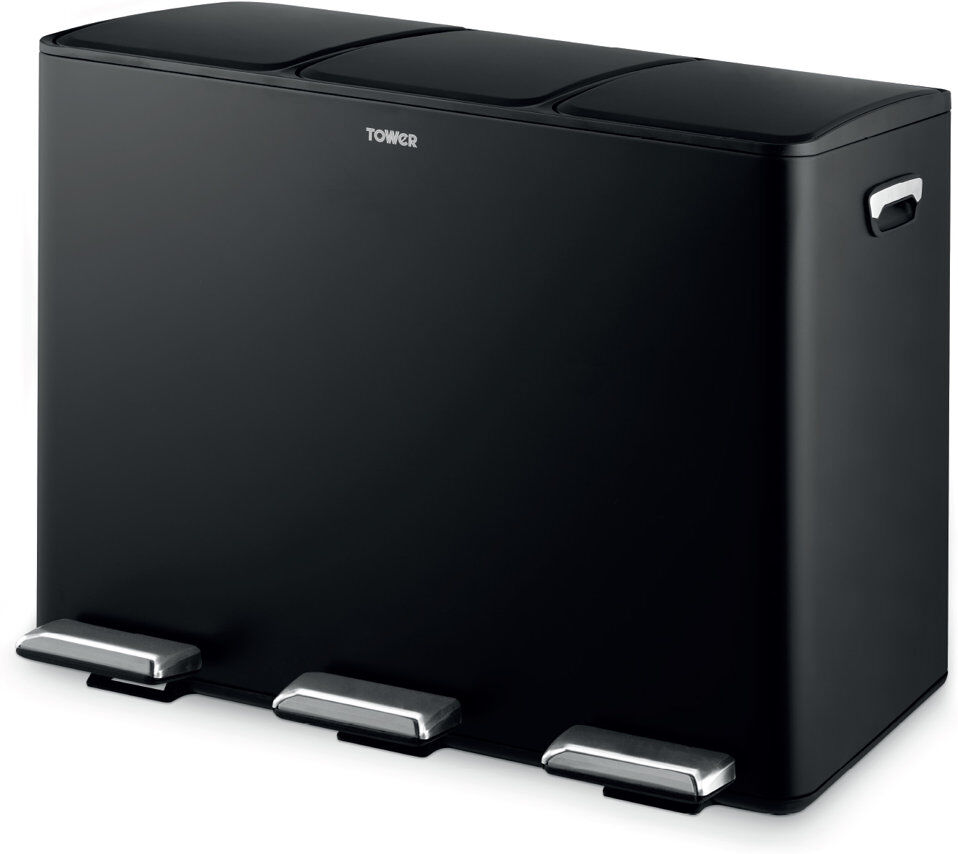
Tower 45 Litre Step On Recycling Bin Black 45LHygienically dispose of your household waste with the 45L Pedal Recycling Bin from Tower. It features a pedal opening system to pop the lid open with ease, perfect for hygienic and hands-free opening. The spacious capacity is ideal for busy households and provides plenty of space to dispose of waste, ensuring you won’t have to constantly empty the bin. Expertly constructed from strong and durable carbon steel, the bin is robust in order to withstand the rigours of a busy household, whilst the carbon steel body has a sleek black powder coating that perfectly complements both modern and traditional décor. Three individual 15L compartments provide the capacity for easy waste disposal and the buckets are easily removable. A simple wipe clean is all that is needed to keep the bin looking its best, whilst the inner buckets can be easily removed for convenient cleaning. COMPLETE HOUSEHOLD RECYCLING SYSTEM: With a spacious 45L capacity, this bin provides the ideal all-round recycling system. Perfect for a busy household, the three different compartments will let you separate your waste with ease for simple & fuss-free recycling & waste disposal. STRONG & DURABLE: Constructed from durable carbon steel, this recycling pedal bin is built to last and withstand the rigours of a busy household. HANDS FREE WASTE DISPOSAL: Each compartment has a foot pedal that allows you to pop open the lid without using your hands, allowing for simple hygienic & fuss-free waste disposal. EASY WIPE CLEAN: Just wipe the bin with a damp cloth to keep it in immaculate condition. The black PP inner buckets can be removed for easy cleaning. 10 YEAR GUARANTEE: Trusted Tower quality with a 1 year guarantee & optional 9 year extension, subject to product registration online. Brand Name: Tower. Colour: Black109,89 £*Shipping: 0,00 £Secure redirect to the provider
-
Vonhaus Stainless Steel 45 Litre Step On Multi-Compartments Trash & Recycling Bin Matte Black 45LVonHaus 30L Dual Compartment Bin for Waste & Recycling Streamline your recycling today. Streamline your waste and separate as you go with the VonHaus dual recycling bin – designed to keep everything in one place and take the hassle out of waste management. The soft-close 85° lid ensures smooth, quiet operation in busy kitchens, without slamming shut or hitting the wall. Double Recycling Bin 2 Compartment Bin with Soft-Close Lids Both hygienic and convenient, this kitchen bin offers hands-free operation, so you can maintain a clean and tidy kitchen. With a compact design ideal for smaller kitchens, the two 15L compartments provide a space-saving solution for bottles, cans, and general waste. Once the kitchen recycling bin is full, use the integrated handles to empty the removable inner bins. Designed to keep your waste in and pests out, the firm-shut odour-seal lids take the rubbish out of rubbish bin! Non-Slip Base Ensures sturdy pedal operation and reduces spills. Even in manic family kitchens, rest assured that the two compartment bin will stay firmly in place. Design Sleek, robust, and rust-resistant. Our dual pedal bin works in any space, with a fingerprint-resistant finish for that smart aesthetic. Hands-Free Operation Waste separation, made simple and hygienic. Create an orderly recycling system with ease using the double compartment bin's foot pedals. 2 x 15L Compartments Space-saving bin with recycling compartment. Easily empty out your dual rubbish bin, or use the inner bins outside for BBQs and garden parties. Ergonomic Soft-Close Lid Use the twin bin without slams or odours escaping. The odour seal traps unpleasant smells, letting you position the double pedal bin anywhere you like. HANDS-FREE OPERATION: Bin your waste without faff, mess, or spillages with the VonHaus 3 compartment bin, finished with firm shut lids to keep furry friends out and an odour seal to keep unwanted smells contained.. 45L TOTAL CAPACITY: Each compartment has a 15L capacity, ideal for small families looking for a compact, organised solution. Measuring H44 x W61.5 x D34.5cm, this triple bin is designed to sit neatly in any space.. REMOVABLE INNER BINS: Make waste organisation a breeze, from sorting your rubbish to emptying out the kitchen recycling bin. The internal buckets feature handles for easy maintenance.. FINGERPRINT-RESISTANT STAINLESS STEEL: Both robust and stylish, this matte black kitchen bin will level up your kitchen – in organisation, style, and quality. Regain order in busy family kitchens today.. OUR BRAND PROMISE: Established in 2009, VonHaus puts kitchen hygiene first. Crafted to the highest quality, upgrade your waste organisation today with our recycling bins for kitchen.. Brand Name: Vonhaus. Colour: Matte Black74,99 £*Shipping: 0,00 £Secure redirect to the provider
-
DRINKPOD Hydrate Mineral Spring Countertop Water Filtration Purification System, 4 Stage Water Filter, Water Dispenser**Upgrade Your Drinking Water with a Premium Tabletop Water Dispenser** Enhance your hydration experience with a high-quality tabletop water dispenser that provides refreshingly pure water at your fingertips.113,15 $*Shipping: 0,00 $Secure redirect to the provider
-
Why does the HP Pavilion laptop stay black?
The HP Pavilion laptop may stay black due to a variety of reasons. It could be a result of a hardware issue such as a faulty display or a disconnected internal component. It could also be caused by a software problem such as a corrupted operating system or a malfunctioning graphics driver. Additionally, the laptop may stay black if the battery is drained or if there is a problem with the power supply. Troubleshooting the specific cause of the black screen can help determine the appropriate solution. **
-
Why is the HP printer 5520 not printing black?
There could be several reasons why the HP printer 5520 is not printing black. One common reason is that the black ink cartridge may be empty or clogged. Another possibility is that the printhead may be dirty or damaged. It is also possible that there may be a software issue causing the printer to not recognize the black ink cartridge. It is recommended to check the ink levels, clean the printhead, and ensure that the correct printer driver is installed to troubleshoot and resolve the issue. **
-
Why is the HP 3070a not printing in black?
The HP 3070a may not be printing in black due to a clogged printhead or a low ink level in the black cartridge. It is also possible that the printer settings are configured to use color ink instead of black ink for printing. Additionally, there may be a software issue or a connectivity problem causing the printer to not recognize the black ink cartridge. It is recommended to check the ink levels, clean the printhead, and ensure that the printer settings are configured correctly to troubleshoot the issue. **
-
Why is the HP Deskjet not accepting the black cartridge?
There could be several reasons why the HP Deskjet is not accepting the black cartridge. It could be due to a compatibility issue with the cartridge, a problem with the cartridge itself, or a problem with the printer's cartridge slot. It's also possible that the cartridge is not properly installed or that there is a problem with the printer's software. It's best to troubleshoot the issue by checking the cartridge for any visible damage, ensuring it is compatible with the printer, and reseating it in the cartridge slot. If the issue persists, contacting HP customer support for further assistance may be necessary. **
Similar search terms for HP-45-51645A-Black
-
HP 970 Original Ink Cartridge - BlackDescription Ideal for users of HP OfficeJet Pro X451, X476, X551 and X576 printers, the HP 970 Original Ink Cartridge provides black ink for everyday printing needs. This standard-size cartridge is supplied as a single item and is designed for use with the specified HP OfficeJet Pro printer models. With a page yield of 3000 pages per cartridge, it supports regular home or office printing while delivering consistent print quality and reliability. The cartridge contains original HP ink and has a weight of 170 g, with dimensions of 7.2 x 2.7 x 24.2 cm (H x W x L). An essential addition for compatible HP OfficeJet Pro printers requiring a black ink cartridge.51,99 £*Shipping: 0,00 £Secure redirect to the provider
-
HP Rechargeable Active Pen G3 - BlackDescription Discover the wonders of digital inking with the HP Rechargeable Active Pen G3. This pen is designed for users who seek a seamless writing and drawing experience on their touch applications. It reduces the force required for inking, making it easier to write and draw onscreen compared to previous models. With a quick launch feature for apps and shortcuts, this pen enhances productivity and creativity. The rechargeable battery ensures that you never miss a note, providing convenience for those who rely on digital tools for their work or hobbies. An essential addition for anyone looking to elevate their digital writing and drawing experience.21,99 £*Shipping: 0,00 £Secure redirect to the provider
-
HP 937e Original Ink Cartridge - BlackDescription The HP 937e Original Ink Cartridge provides black ink for compatible HP OfficeJet Pro printers. It is designed for users who need consistent, high-quality prints with sharp text and reliable performance. This XL cartridge has an approximate yield of 2,500 black pages, helping support regular printing requirements. It is designed to work with HP OfficeJet Pro 9010, 9010e, 9020 and 9020e series printers, delivering consistent results from the first print. Original HP Ink also helps preserve important moments over time. When the cartridge is finished, it can be recycled at no cost through the HP Planet Partners programme. Free recycling envelopes and boxes with pre-paid shipping can be ordered online. An essential addition for compatible HP OfficeJet Pro printers and everyday black document printing.66,99 £*Shipping: 0,00 £Secure redirect to the provider
-
Why can't I print in black with the HP 5510?
There could be several reasons why you are unable to print in black with the HP 5510. One possible reason is that the black ink cartridge may be empty or clogged. Another reason could be that the printer settings may be set to use only color ink. Additionally, there may be a software issue or a problem with the printer's hardware. It is recommended to check the ink levels, clean the printhead, and ensure that the printer settings are configured correctly to troubleshoot the issue. If the problem persists, contacting HP customer support for further assistance may be necessary. **
-
Can a HP printer only be operated with black ink?
No, a HP printer can be operated with both black and color ink. Many HP printers are designed to accommodate both black and color ink cartridges, allowing users to print in a variety of colors. Additionally, some HP printers also have the option to print in grayscale using only the black ink cartridge, but this is not the only option for operating the printer. **
-
Why does the HP 4525 print in green instead of black?
The HP 4525 printer may be printing in green instead of black due to a few possible reasons. One reason could be that the black ink cartridge is empty or clogged, causing the printer to mix the remaining colors to create a greenish hue. Another reason could be a software or driver issue, causing the printer to interpret black as green. It's also possible that the printer settings have been adjusted to print in a different color mode, such as grayscale or color correction, resulting in a green tint to the black text. Troubleshooting these potential issues and ensuring that the printer is using the correct settings and ink cartridges should help resolve the problem. **
-
Why does the HP printer only print in black and white?
The HP printer may only print in black and white if the color ink cartridges are empty or malfunctioning. In this case, the printer will default to printing in black and white to ensure that documents can still be printed. Additionally, the printer settings may have been adjusted to print in black and white only. It is also possible that the printer model is designed to only print in black and white, and does not have color printing capabilities. **
* All prices are inclusive of VAT and, if applicable, plus shipping costs. The offer information is based on the details provided by the respective shop and is updated through automated processes. Real-time updates do not occur, so deviations can occur in individual cases. ** Note: Parts of this content were created by AI.